
Winroll Registration
Winroll registration takes 2 to 3 minutes and creates your profile on winroll.eu. Keep one account for all play rather than opening separate profiles. Start with accessible contact details, then complete our sign-up form carefully. Accurate information gives us a consistent record for later identity checks and helps avoid corrections before requesting a payout.
Before You Register at Winroll Casino
Prepare for Winroll registration with a device connected to the internet and a working email address or phone number. Players must be at least 18. Enter real details that match supporting documents, rather than nicknames or borrowed information. Keep access to whichever contact method you provide, since receiving our confirmation requires it. Read each field before submitting, especially when entering details through a small screen. If an existing profile belongs to you, use that instead of starting again.
Completed Winroll registration gives you a starting point for games, deposits, withdrawals and support. Treat those features separately: creating access does not replace the identity check required before payout. Decide on an entertainment budget before adding funds, keeping essential expenses outside that amount. A spending plan should reflect money available for recreation, not expected winnings. There is no need to rush straight into play after joining.
How to Register at Winroll Casino
Begin Winroll registration directly through our official address. Keep contact details ready, leave enough time to read each entry, and follow these steps in order. Our form collects sign-up information first; personal identity details come later during verification. Avoid submitting unfinished entries simply to move forward.
- Type winroll.eu into the browser address bar yourself.
- Press the registration control to open our form.
- Enter an email or phone number and create a password.
- Choose USD as the currency and select the country field accurately.
- Confirm age eligibility and acceptance of our terms.
- Enter our confirmation code or follow the link sent to the contact provided, then sign in.
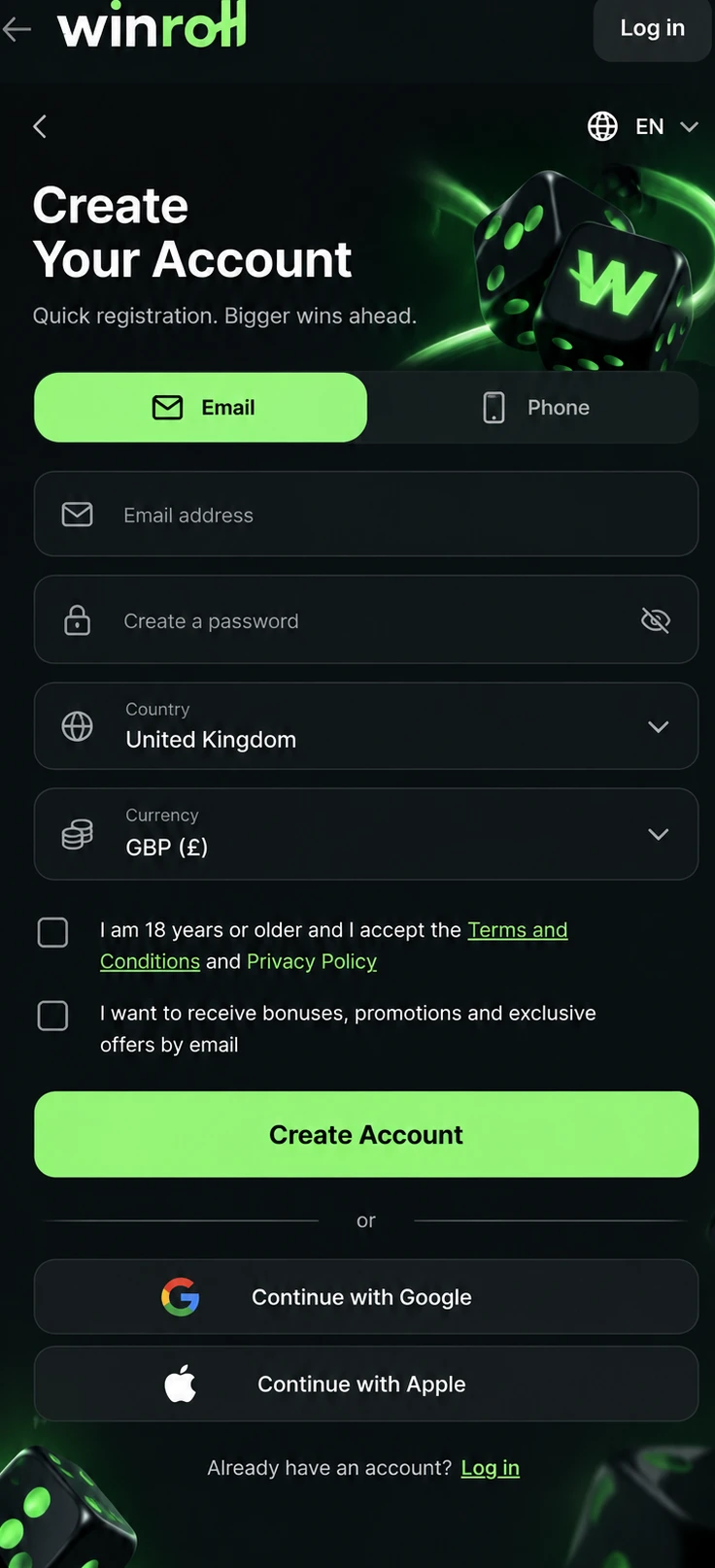
After Winroll registration, check that the browser still shows winroll.eu before continuing. Fake copies exist, so recognise our address rather than trusting a familiar-looking screen. If something looks wrong, stop entering information and return through a freshly typed address. Keep sign-up messages private instead of forwarding them to anyone offering assistance.
Data You Provide
Our initial form asks for contact and access details alongside profile settings. Later, identity checks collect personal information against supporting records. Use the table to distinguish those stages before submitting anything. Currency selection is permanent after sign-up, so make that choice carefully rather than treating it as a temporary preference.
| Data | When We Ask | Requirement |
|---|---|---|
| Email or phone | Sign-up | 6-digit code; valid for 15 minutes |
| Password | Sign-up | At least 8 characters, 1 letter and 1 number |
| Currency | Sign-up | 1 currency per account; USD |
| Country | Sign-up | 1 country per account |
| Name and date of birth | Verification | Real details; eligible age |
| Address | Verification | Proof not older than 3 months |
Mismatched entries require correction before we can complete an identity review. Compare spelling, birth details and address information with supporting records rather than guessing. Explain an error when seeking help so we can understand which entry needs attention. Opening another profile does not resolve inconsistent information and conflicts with our single-profile rule.
Account Verification at Winroll Casino
Identity checks connect information supplied during Winroll registration with the person using our service. We ask for a name, date of birth and address at this stage. These details establish a consistent identity record rather than merely repeating contact information. Review each entry against supporting paperwork before submission, particularly spelling and numbers that are easy to mistype.
Preparation after Winroll registration starts with valid, unexpired photo ID and proof of address. A passport, ID card or driving licence provides generic examples of identification; a utility bill or bank statement provides address evidence. Photograph records clearly, showing complete edges and readable text. Avoid glare, shadows or cropped sections that prevent us from reading details. Check each image before sending it.
We complete verification once, before the first withdrawal. Review takes from a few hours to 3 business days. Finishing Winroll registration does not mean this separate check has already been completed. Allow for that review period when planning a payout request, and supply readable evidence rather than several unclear versions. Keep supporting records available while we assess the submission.
Steps After Registration
After Winroll registration, move through these next steps at a comfortable pace. Start by reviewing saved information, then decide whether to continue with funded play. Joining does not require an immediate spending decision. Take time to understand available choices before committing money or beginning a session.
- Sign in and check saved profile details. Resolve typing errors before relying on those entries for later checks.
- Once you have completed all the steps, you can take our welcome bonus: WELCOME PACKAGE. Full conditions are in the bonus section of winroll.eu.
- Make a first deposit only within an established budget. Keep money needed for bills or other commitments separate.
- Explore available games and begin with a few titles. Read their rules before deciding what to play.
- Set personal time and money limits. Visit our responsible gaming page before settling into a routine.
Gambling is entertainment, never income. End sessions according to a plan rather than chasing a result, and step away when play stops feeling recreational. Taking a break remains a sensible choice regardless of previous outcomes. Keep spending decisions separate from any expectation that another game will recover earlier losses.
Account Security at Winroll Casino
Protect access from the moment Winroll registration is complete. Contact details and sign-in credentials serve different purposes, but both deserve careful handling. Keep private information away from shared conversations and unattended screens. Consistent habits matter whenever returning to play, not only during the first visit.
- Choose a strong, unique password.
- Never share confirmation codes with another person.
- Sign out after using shared devices.
- Type winroll.eu yourself instead of following unfamiliar links.
- Keep contact details current.
We never ask for your password by message. Treat requests for that secret as a reason to stop responding, even when a sender claims to represent us. Protecting access also means checking what is being requested before replying. A familiar display name alone does not establish who sent a message.
Troubleshooting Winroll Registration
An interrupted Winroll registration can involve a typing error, an undelivered confirmation, or credentials that fail our stated requirements. Incorrect currency or country selections also need attention. Age ineligibility and duplicate profiles prevent a valid sign-up; repeating attempts does not remove those restrictions. Identify which stage stopped before changing unrelated entries. Read any displayed message carefully, then compare it with information already entered. Avoid repeatedly submitting different details just to get past a screen.
First, review spelling and the selected settings, then check the email inbox or phone used for confirmation. Ensure credentials meet our requirements and that any entered code remains valid. If the problem continues, write to support@winroll.eu with the step reached, what appeared onscreen, device and browser. Describe the issue without including private sign-in secrets. Never send a password. A focused explanation gives us the information needed to address the interrupted process without introducing unrelated changes.
Last updated: